What Is the Point of Vite+? Evan You and His "Unified Frontend Toolchain"
March 29, 2026Elecmonkey
This article was translated by AI and has not been manually reviewed.
Introduction
I remember that in an interview video about a year ago, Evan You once said that Vite+ would be a commercial product from VoidZero. However, when it was finally released (Announcing Vite+ Alpha), Vite+ was still open-sourced under the MIT license.
Vite+ Has a Threshold
Can You Upgrade to Vite 8?
First, the Vite+ ecosystem is built on top of the oxc/Rolldown stack, so the Vite version must be Vite 8 (Rolldown). For existing projects, whether Vite+ can be used depends on whether the project can smoothly upgrade to Vite 8 and whether the surrounding toolchain can be smoothly replaced by oxlint/oxfmt and similar tools.
In my experience, if the project itself is on an older version of Vite, upgrading to Vite 8 should not be too stressful, unless certain rollup behaviors are targeted in the configuration. rolldown should be mostly compatible, but some manual migration is indeed needed. A Vite project created with the official scaffold and configured only with common community plugins such as vite-plugin-vue and TailwindCSS should upgrade to Vite 8 very smoothly.
If the project itself uses webpack, including vue-cli and create-react-app, migrating to Vite becomes much more painful. Many webpack-based frontend projects use CommonJS as their module standard, while Vite has always been a bundler centered on the ESM ecosystem. In these old projects, internal modules are often written in CommonJS, and relatively old third-party libraries are usually distributed as CommonJS too. I have tried to migrate two fairly large webpack projects to Vite, and in both cases I backed down after encountering large-scale errors.
In the end, both projects were migrated to Rsbuild based on Rspack. That ecosystem's compatibility with Webpack is indeed excellent.
Migrating the Linter and Formatter
What bothers me first is that I have not yet seen an old project that seriously uses eslint and prettier. They are installed in the project, and there are commands like npm run lint, but running them produces thousands of errors. In this situation I can only delete eslint directly... I fully understand that the people who configured these projects did so with lofty ideals: unified indentation, unified quote and semicolon style, no unused imports, no unchanged let variables... Unfortunately, that era had no AI Agent, and the team did not configure automatic CI checks. Once code style depended entirely on individual discipline, eslint simply became a decoration.
At present, as of the publication of this article, oxlint is still immature. The recommended practice in the official documentation is still to install an eslint-plugin-oxlint plugin, disable the rules already supported by oxlint, and then run eslint and oxlint at the same time during linting. For projects already using flat config, oxlint provides @oxlint/migrate to automatically migrate eslint configuration files to oxlint. However, upgrading a project from eslint 8 to 9 and from traditional .eslintrc to eslint.config.m(j|t)s also takes some work.
Sorry, I did not see this when writing the article... updating with an addendum:
Oxlint: JS Plugins Alpha
Oxlint's JS Plugins Alpha brings near-100% compatibility with the ESLint plugin ecosystem. Your existing ESLint plugins run inside Oxlint unmodified, alongside 650+ native Rust rules, while linting up to 100x faster than ESLint.
By comparison, oxfmt has much better compatibility with prettier. oxfmt is compatible with most of prettier's built-in behavior and supports common plugin needs, such as import sorting, TailwindCSS class name sorting, package.json sorting, and so on. However, oxfmt officially announced that it does not plan to support prettier plugins, so users of prettier plugins whose capabilities are not built into oxc cannot migrate at all.
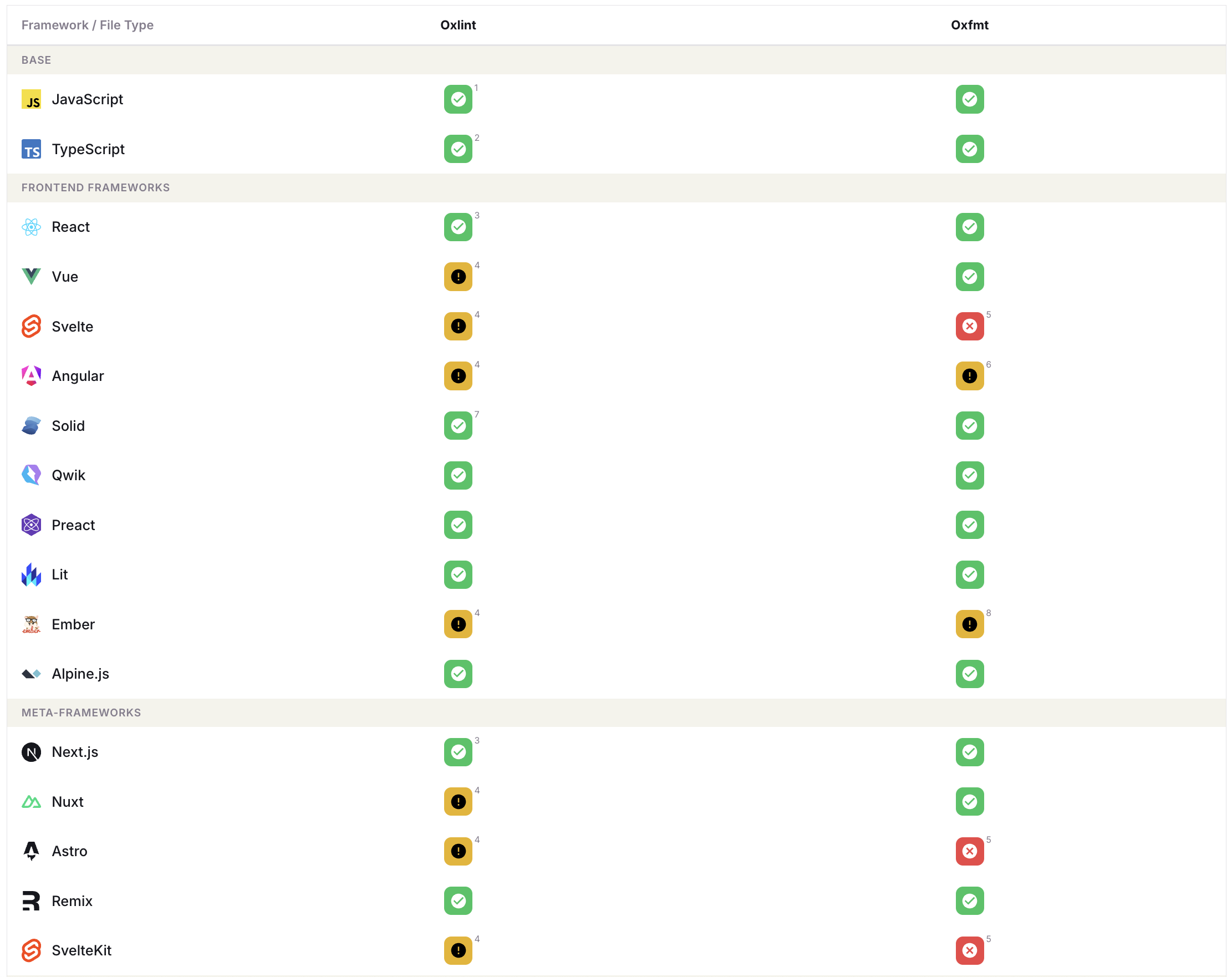
https://oxc.rs/compatibility.html has a compatibility matrix for framework DSLs. It can be said that the current situation is not optimistic. In addition, not supporting third-party plugins means that whether future new frameworks and new DSLs can be supported depends entirely on the oxc team's development plan. In a sense, this does not fit the underlying nature of the Vite ecosystem. For example, recently an author has been working on a framework called Ripple. With meta-frameworks, every household can come up with some syntax of its own. As these DSLs emerge in all kinds of forms, using oxc may mean giving up certain choices.
What Kind of Business Scenario Needs Vite+?
Quick Start vs. Selection Rights
Of course, as a tool, Vite+ cannot stop users from choosing not to run vp check and instead running vp run lint to execute their own npm scripts. It also cannot stop CI from continuing to use eslint and prettier for checks. It is just that such a split and inelegant situation does not seem to align with Vite+'s original intention.
Vite+ provides Node.js version management, so I no longer need to configure nvm; vp proxies the package manager, so I no longer need to manually type pnpm. Vite+ provides pre-commit checks, replacing husky configuration in the project.
But requirements are diverse, and production or CI environments can be complex. As I mentioned above, it restricts my right to choose community solutions, and Vite+ itself also restricts my willingness to choose toolchains. From this perspective, for frontend developers familiar with these tools and the community ecosystem, Vite+ may not necessarily be appealing. It does not bring any new features, nor does it offer a non-invasive, progressively adoptable path. Within the frontend community, willingness to adopt Vite+ is very likely to be limited.
Newcomer Friendly / Agent Friendly
Although Vite+ narrows the range of choices, it also provides a complete, opinionated selection of frontend ecosystem tools. For frontend beginners, if they do not have to struggle to set up a project at the start and can instead complete project setup with one command, including a full production toolchain configuration, it should greatly lower the learning threshold for frontend development.
If, in the future, AI knowledge bases can learn Vite+ and are willing to use it, or deliberately install Vite+'s llms.txt / related skills, it should greatly reduce the chances of AI making mistakes during project setup.
Let AI create a project by itself; I have never seen any AI proactively configure a bunch of constraints and rules for itself...
For backend developers who are not very familiar with frontend development, Vite+'s unified toolchain may lower the threshold for solving frontend requirements through Vibe Coding. But for non-technical people who know nothing and need full-stack Vibe Coding, the solution Vite+ provides may not leave much impression on them. They probably need a one-stop solution like Next.js/Nuxt + Supabase more.